Posts

S.M.A.R.T. on Arch Linux

As usual Arch Linux does not install a binary that you might not need to have. So we need to run: [root@archt20 ~]# pacman -S smartmontools Then simply: [bart@archt20 ~]$ smartctl -a /dev/sda It is also worth to install hdparm [root@archt20 ~]# pacman -S hdparm [root@archt20 ~]# hdparm /dev/sda /dev/sda:  multcount     = 16 (on)  IO_support    =  1 (32-bit)  readonly      =  0 (off)  readahead     = 256 (on)  geometry      = 60801/255/63, sectors = 976773168, start = 0

How to add gcc to Arch Linux

I was playing with go and it turned out that my Linux does not have gcc that is necessary to compile code that uses cgo. Solution as always with Arch Linux was straightforward: [bart@archt20 ~]$ sudo pacman -S base-devel :: There are 25 members in group base-devel: :: Repository core    1) autoconf  2) automake  3) binutils  4) bison  5) fakeroot  6) file  7) findutils  8) flex  9) gawk  10) gcc  11) gettext  12) grep  13) groff  14) gzip    15) libtool  16) m4  17) make  18) pacman  19) patch  20) pkg-config  21) sed  22) sudo  23) texinfo  24) util-linux  25) which Enter a selection (default=all):

Upgrading old TPLink 1043nd with latest Open WRT

Main purpose is to have SSH tunel to my remote home network. Update root@OpenWrt:/tmp# wget http://downloads.openwrt.org/chaos_calmer/15.05.1/ar71xx/generic/openwrt-15.05.1-ar71xx-generic-tl-wr1043nd-v1-squashfs-sysupgrade.bin Connecting to downloads.openwrt.org (78.24.191.177:80) openwrt-15.05.1-ar71 100% root@OpenWrt:/tmp# ls -la -rw-r--r--    1 root     root       3473412 Feb 17 10:11 openwrt-15.05.1-ar71xx-generic-tl-wr1043nd-v1-squashfs-sysupgrade.bin root@OpenWrt:/tmp# md5sum openwrt-15.05.1-ar71xx-generic-tl-wr1043nd-v1-squashfs-sysupgrade.bin f5f073251dd3b191e9ed806cb95de029  openwrt-15.05.1-ar71xx-generic-tl-wr1043nd-v1-squashfs-sysupgrade.bin Unlocking firmware ... Writing from openwrt-15.05.1-ar71xx-generic-tl-wr1043nd-v1-squashfs-sysupgrade.bin to firmware ... Rebooting ... Turning router into access point I've edited network config file: config interface 'lan'         option ifname 'eth0.1' ...

Stil A+ on qualys on Arch Linux

Image
https://www.ssllabs.com/ssltest/analyze.html?d=bart.prokop.name The one domain that cannot get behind cloud flare... but still pretty secure.
OVH recently added IPv6 addresses for all their VPS hosts. Unfortunately they did not provided the instructions how to add IPv6 support for their Arch Linux distribution. Here is what have worked for me (highlighted are changes to default file value): # cd /etc/systemd/network # cp eth0-dhcp.network eth0-dhcp.network.ORIGINAL # cat eth0-dhcp.network [Match] Name=eth0 [Network] DHCP= ipv4 [DHCP] UseMTU=true [Address] A ddress=2001:xxxx:xxxx:xxxx:xxxx:xxxx:xxxx:1234 /64 [Route] Gateway= 2001 :xxxx:xxxx:xxxx:xxxx:xxxx:xxxx:0001 # networkctl status et0 Please note that default OVH recommendation (i.e. /128 mask and static route to gateway) is not possible to achieve with systemd networking. That is why I went with /64 mask and simple Gateway option.

Runnig Spring Boot Application on Arch Linux

We need to create new "simple" systemd service. It is just a single text file. # pwd /etc/systemd/system Create file: whatever_you_want.service with similar content [Unit] Description=webserver Daemon [Service] ExecStart=/opt/jdk1.8.0_101/bin/java -Djava.security.egd=file:/dev/./urandom -jar /root/spring-boot-1.0-BETA.jar User=user [Install] WantedBy=multi-user.target That's really it!. Now you can use following commands to control newly created service. To start the service # systemctl start whatever_you_want.service To auto start the service # systemctl enable whatever_you_want.service [root@vps]# systemctl enable flex-demo Created symlink /etc/systemd/system/multi-user.target.wants/whatever_you_want.service → /etc/systemd/system/whatever_you_want.service. To stop autostart # systemctl disable whatever_you_want.service To stop the service # systemctl stop whatever_you_want.service To restart the service ...

Fixing upstream DNS issue with OpenWRT

Image
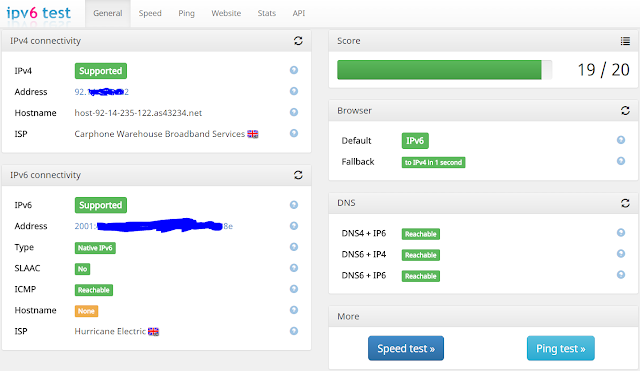
Problem: My Internet Provider provides crappy and "filtered" (monitored + augmented) DNS server withe their DHCP configured IPv4 connection. The intention is to use only Google Public DNS for resolution. It seems that all might be achieved by simply fixing /etc/config/network: Adding ### lines does: config interface 'wan'         option ifname 'eth0.2'         option proto 'dhcp'         option peerdns '0' # do not use upstream DNS         list   dns '8.8.8.8' # use this particular DNS         list   dns '8.8.4.4' # use that particular DNS The above instantaneously  bumped scoring up by 4 to 19/20. Most flagged issued were with DNS service. My ISP unfortunately  provides slow IPv4. Switching to Google public DNS served, fixed also IPv6 connectivity. This also shows how far away is IPv6 adoption by my IPS.