Posts

Google App Engine and Spring MVC 5

I've tried new Spring Framework (Wweb MVC 5) with Standard AppEngine runtime (Java8). Unfortunately "most standard" approach to initialise application with extending AbstractAnnotationConfigDispatcherServletInitializer  class has failed miserably: public class EntryPoint extends AbstractAnnotationConfigDispatcherServletInitializer {     @Override     protected Class<?>[] getRootConfigClasses() {         return new Class<?>[]{RootConf.class};     }     @Override     protected Class<?>[] getServletConfigClasses() {         return new Class<?>[]{WebConf.class};     }     @Override     protected String[] getServletMappings() {         return new String[]{"/"};     } } The failure was (it really seems to be platform rather than Spring issue): org.eclipse.jetty.annotations.ServletContainerIn...

git my cheat sheet

How to tag code with specific key PGP for signature (especially when there is discrepancy between git email address and PGP key email address): git tag -a v1.2.3 -m "Tagging something" -u your-key-id git show v1.2.3 git push origin --tags How to 

SSH Tunel with OpenWRT

You need to install OpenSSH client: root@OpenWrt:~# opkg update root@OpenWrt:~# opkg install openssh-client Now OpenSSH client replaced DropBear client: root@OpenWrt:~# ls -l /usr/bin/ssh -rwxr-xr-x    1 root     root        590667 May 24 14:54 /usr/bin/ssh root@OpenWrt:~# ls -l /rom/usr/bin/ssh lrwxrwxrwx    1 root     root            16 Aug 19  2016 /rom/usr/bin/ssh -> ../sbin/dropbear root@OpenWrt:~# ls -l /overlay/upper/usr/bin/ssh -rwxr-xr-x    1 root     root        590667 May 24 14:54 /overlay/upper/usr/bin/ssh Can you spot a difference: root@OpenWrt:~# ssh usage: ssh [-1246AaCfGgKkMNnqsTtVvXxYy] [-b bind_address] [-c cipher_spec]            [-D [bind_address:]port] [-E log_file] [-e escape_char]            [-F configfile] [-I pkcs11] [-i identity_file...

Gnu PGP my cheat sheet

How to import PGP public key? gpg --import 99242560.key gpg: key DB698D7199242560: public key "David M. Shaw <dshaw@jabberwocky.com>" imported gpg: Total number processed: 1 gpg:               imported: 1 gpg: marginals needed: 3  completes needed: 1  trust model: pgp gpg: depth: 0  valid:   1  signed:   0  trust: 0-, 0q, 0n, 0m, 0f, 1u gpg: next trustdb check due at 2018-01-09 How to verify the file signature? gpg --verify paperkey-1.4-win32.zip.sig gpg: assuming signed data in 'paperkey-1.4-win32.zip' gpg: Signature made 09/06/16 02:01:14 GMT Daylight Time gpg:                using RSA key FEA78A7AA1BC4FA4 gpg: Good signature from "David M. Shaw <dshaw@jabberwocky.com>" [unknown] gpg: WARNING: This key is not certified with a trusted signature! gpg:          There is no indication that the signature belongs to the owner. Pr...

S.M.A.R.T. on Arch Linux

As usual Arch Linux does not install a binary that you might not need to have. So we need to run: [root@archt20 ~]# pacman -S smartmontools Then simply: [bart@archt20 ~]$ smartctl -a /dev/sda It is also worth to install hdparm [root@archt20 ~]# pacman -S hdparm [root@archt20 ~]# hdparm /dev/sda /dev/sda:  multcount     = 16 (on)  IO_support    =  1 (32-bit)  readonly      =  0 (off)  readahead     = 256 (on)  geometry      = 60801/255/63, sectors = 976773168, start = 0

How to add gcc to Arch Linux

I was playing with go and it turned out that my Linux does not have gcc that is necessary to compile code that uses cgo. Solution as always with Arch Linux was straightforward: [bart@archt20 ~]$ sudo pacman -S base-devel :: There are 25 members in group base-devel: :: Repository core    1) autoconf  2) automake  3) binutils  4) bison  5) fakeroot  6) file  7) findutils  8) flex  9) gawk  10) gcc  11) gettext  12) grep  13) groff  14) gzip    15) libtool  16) m4  17) make  18) pacman  19) patch  20) pkg-config  21) sed  22) sudo  23) texinfo  24) util-linux  25) which Enter a selection (default=all):

Upgrading old TPLink 1043nd with latest Open WRT

Main purpose is to have SSH tunel to my remote home network. Update root@OpenWrt:/tmp# wget http://downloads.openwrt.org/chaos_calmer/15.05.1/ar71xx/generic/openwrt-15.05.1-ar71xx-generic-tl-wr1043nd-v1-squashfs-sysupgrade.bin Connecting to downloads.openwrt.org (78.24.191.177:80) openwrt-15.05.1-ar71 100% root@OpenWrt:/tmp# ls -la -rw-r--r--    1 root     root       3473412 Feb 17 10:11 openwrt-15.05.1-ar71xx-generic-tl-wr1043nd-v1-squashfs-sysupgrade.bin root@OpenWrt:/tmp# md5sum openwrt-15.05.1-ar71xx-generic-tl-wr1043nd-v1-squashfs-sysupgrade.bin f5f073251dd3b191e9ed806cb95de029  openwrt-15.05.1-ar71xx-generic-tl-wr1043nd-v1-squashfs-sysupgrade.bin Unlocking firmware ... Writing from openwrt-15.05.1-ar71xx-generic-tl-wr1043nd-v1-squashfs-sysupgrade.bin to firmware ... Rebooting ... Turning router into access point I've edited network config file: config interface 'lan'         option ifname 'eth0.1' ...

Stil A+ on qualys on Arch Linux

Image
https://www.ssllabs.com/ssltest/analyze.html?d=bart.prokop.name The one domain that cannot get behind cloud flare... but still pretty secure.
OVH recently added IPv6 addresses for all their VPS hosts. Unfortunately they did not provided the instructions how to add IPv6 support for their Arch Linux distribution. Here is what have worked for me (highlighted are changes to default file value): # cd /etc/systemd/network # cp eth0-dhcp.network eth0-dhcp.network.ORIGINAL # cat eth0-dhcp.network [Match] Name=eth0 [Network] DHCP= ipv4 [DHCP] UseMTU=true [Address] A ddress=2001:xxxx:xxxx:xxxx:xxxx:xxxx:xxxx:1234 /64 [Route] Gateway= 2001 :xxxx:xxxx:xxxx:xxxx:xxxx:xxxx:0001 # networkctl status et0 Please note that default OVH recommendation (i.e. /128 mask and static route to gateway) is not possible to achieve with systemd networking. That is why I went with /64 mask and simple Gateway option.

Runnig Spring Boot Application on Arch Linux

We need to create new "simple" systemd service. It is just a single text file. # pwd /etc/systemd/system Create file: whatever_you_want.service with similar content [Unit] Description=webserver Daemon [Service] ExecStart=/opt/jdk1.8.0_101/bin/java -Djava.security.egd=file:/dev/./urandom -jar /root/spring-boot-1.0-BETA.jar User=user [Install] WantedBy=multi-user.target That's really it!. Now you can use following commands to control newly created service. To start the service # systemctl start whatever_you_want.service To auto start the service # systemctl enable whatever_you_want.service [root@vps]# systemctl enable flex-demo Created symlink /etc/systemd/system/multi-user.target.wants/whatever_you_want.service → /etc/systemd/system/whatever_you_want.service. To stop autostart # systemctl disable whatever_you_want.service To stop the service # systemctl stop whatever_you_want.service To restart the service ...

Fixing upstream DNS issue with OpenWRT

Image
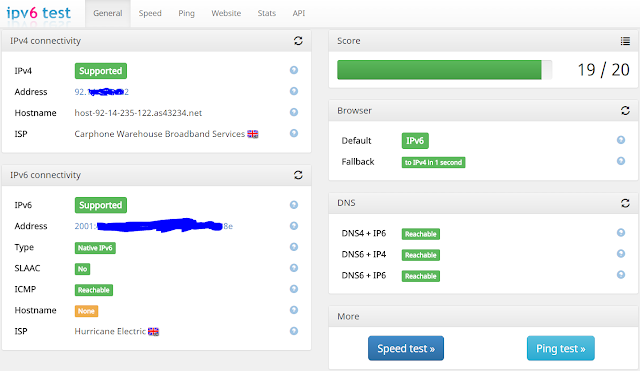
Problem: My Internet Provider provides crappy and "filtered" (monitored + augmented) DNS server withe their DHCP configured IPv4 connection. The intention is to use only Google Public DNS for resolution. It seems that all might be achieved by simply fixing /etc/config/network: Adding ### lines does: config interface 'wan'         option ifname 'eth0.2'         option proto 'dhcp'         option peerdns '0' # do not use upstream DNS         list   dns '8.8.8.8' # use this particular DNS         list   dns '8.8.4.4' # use that particular DNS The above instantaneously  bumped scoring up by 4 to 19/20. Most flagged issued were with DNS service. My ISP unfortunately  provides slow IPv4. Switching to Google public DNS served, fixed also IPv6 connectivity. This also shows how far away is IPv6 adoption by my IPS.

How to proxy SpringBoot application via Apache HTTPD

First we need to add the following to virtual host definition. ProxyPass / http://127.0.0.1:8080/ ProxyPassReverse / http://127.0.0.1:8080/ Enable the following modules: LoadModule proxy_module modules/mod_proxy.so LoadModule proxy_http_module modules/mod_proxy_http.so Run SpringBoot application. Note that it starts on 127.0.0.1 interface. Also note that we pass extra parameter allowing for non-blocking entropy source. /opt/jdk1.8.0_101/bin/java -Dserver.address=127.0.0.1 -Djava.security.egd=file:/dev/./urandom -jar spring-boot-app.jar & Restart webserver systemctl restart httpd That's all folks!

Putty and KeePass

Image
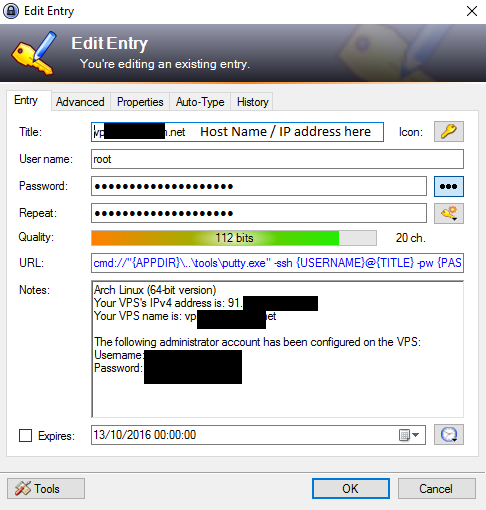
I use KeePass as my password manager. I have a dozen SSH credentials stored there. It is some daunting work to enter credentials all the time for putty client. So I decided to automate that using URL field. My "opt" directory structure is as follow: bart@DELL-E7250 ~/OneDrive/opt $ find ./KeePass-2.33 ./KeePass-2.33/KeePass.chm ./KeePass-2.33/KeePass.config.xml ./KeePass-2.33/KeePass.exe ./KeePass-2.33/KeePass.exe.config ./KeePass-2.33/KeePass.XmlSerialize ... ./tools ./tools/PartCopy.exe ./tools/PartCopy.ini ./tools/PCATTCP.exe ./tools/PUTTY.EXE ./tools/sha1sum.exe So I decided to put the following to URL field: cmd://"{APPDIR}\..\tools\putty.exe" -ssh {USERNAME}@{TITLE} It is also possible to specify password: cmd://"{APPDIR}\..\tools\putty.exe" -ssh {USERNAME}@{TITLE} -pw {PASSWORD} Now all what I have to do is to double click URL cell and KeePass will run putty and connect to server automatically. Note that using version with pa...

TLS in a hard way

Image
How I've push it to the limits. 1. Use only most secure ciphers with forward secrecy. SSLCipherSuite HIGH:MEDIUM:!SSLv3:!kRSA SSLProxyCipherSuite HIGH:MEDIUM:!SSLv3:!kRSA 2. Enable SSL. # diff httpd.conf httpd.conf.ORIGINAL 90c90 < LoadModule socache_shmcb_module modules/mod_socache_shmcb.so --- > # LoadModule socache_shmcb_module modules/mod_socache_shmcb.so 148c148 < LoadModule ssl_module modules/mod_ssl.so --- > # LoadModule ssl_module modules/mod_ssl.so 516c516 < Include conf/extra/httpd-ssl.conf --- > # Include conf/extra/httpd-ssl.conf 3. Enable vhosts. Note that SSL is enabled before vhosts (as SSL config contains VHost, and default VHost is first)... # diff httpd.conf httpd.conf.ORIGINAL 515,517c515,516 < # Secure (SSL/TLS) connections and Virtual hosts < Include conf/extra/httpd-ssl.conf < Include conf/extra/httpd-vhosts.conf --- > # Secure (SSL/TLS) connections > #Include conf/extra/httpd-ssl.conf 4. Restar...

Adding web interface to OpenWRT

LuCI Web interface is nice, if only just to see nice graph: root@OpenWrt:~# opkg update root@OpenWrt:~# opkg install luci-ssl Seeing one error: Configuring luci-theme-bootstrap. //usr/lib/opkg/info/luci-theme-bootstrap.postinst: .: line 130: can't open './30_luci-theme-bootstrap' //usr/lib/opkg/info/luci-theme-bootstrap.postinst: .: line 130: can't open './30_luci-theme-bootstrap' Configuring luci-mod-admin-full. //usr/lib/opkg/info/luci-mod-admin-full.postinst: .: line 130: can't open './50_luci-mod-admin-full' //usr/lib/opkg/info/luci-mod-admin-full.postinst: .: line 130: can't open './50_luci-mod-admin-full'

Restarting OpenWRT every week

Very simply, start to edit crontab: root@OpenWrt:/etc/init.d# crontab -e Add the following line: 30 4 * * * reboot That is it!

How to get A+ on qualsys SSL test

Image
The default Arch Linux Apache "out of the box" scored A: After simply following recommendation from httpd-ssl.conf file: #  By the end of 2016, only TLSv1.2 ciphers should remain in use. #  Older ciphers should be disallowed as soon as possible, while the #  kRSA ciphers do not offer forward secrecy.  These changes inhibit #  older clients (such as IE6 SP2 or IE8 on Windows XP, or other legacy #  non-browser tooling) from successfully connecting. # #  To restrict mod_ssl to use only TLSv1.2 ciphers, and disable #  those protocols which do not support forward secrecy, replace #  the SSLCipherSuite and SSLProxyCipherSuite directives above with #  the following two directives, as soon as practical. SSLCipherSuite HIGH:MEDIUM:!SSLv3:!kRSA SSLProxyCipherSuite HIGH:MEDIUM:!SSLv3:!kRSA It turned to be... still A: So how to get it to A+? Simply enable HSTS by adding this simple line to virtual SSL host definition (...

Let's encrypt on Arch Linux

First we need apache and let's encrypt client: pacman -S certbot As Apache is running on port 80, and we do not want any interruption to the service, we will use "webroot" plugin. Assuming our domain is www.bogus.com, the request will look like this: certbot certonly --email p******t@gmail.com --webroot -w /srv/http/ -d www.secure.com  - Your account credentials have been saved in your Certbot    configuration directory at /etc/letsencrypt. You should make a    secure backup of this folder now. This configuration directory will    also contain certificates and private keys obtained by Certbot so    making regular backups of this folder is ideal. Note: you do not need to enter e-mail address again. IMPORTANT NOTES:  - Congratulations! Your certificate and chain have been saved at    /etc/letsencrypt/live/flex.prkp.eu/fullchain.pem. Your cert will    expire on 2016-12-13. To obtain a new...

OpenWRT extroot - and multiple configuration profile.

My GL-MT300A has 16GB mmc card installed inside. So I decided to create three swap-able extroots. That way, I can use various configuration "profiles", as well as have a "fail-back" configuration. First I partitioned my mmc card in the following way: root@OpenWrt:~# fdisk -l /dev/mmcblk0 Disk /dev/mmcblk0: 14.5 GiB, 15560867840 bytes, 30392320 sectors Units: sectors of 1 * 512 = 512 bytes Sector size (logical/physical): 512 bytes / 512 bytes I/O size (minimum/optimal): 512 bytes / 512 bytes Disklabel type: dos Disk identifier: 0x080b255d Device         Boot   Start      End  Sectors  Size Id Type /dev/mmcblk0p1         2048  1050623  1048576  512M 83 Linux /dev/mmcblk0p2      1050624  2099199  1048576  512M 83 Linux /dev/mmcblk0p3      2099200  3147775  1048576  512M 83 Linux /dev/mmcblk0p4      3147776 30392319 2724...

GL-MT300A What to install on trunk DD

As trunk is very minimal, here is list, what I do install: 1. Before extroot: opkg install kmod-rt2800-usb [ 1782.369777] usbcore: registered new interface driver rt2800usb opkg install kmod-sdhci-mt7620 [ 1832.552022] sdhci: Secure Digital Host Controller Interface driver [ 1832.558421] sdhci: Copyright(c) Pierre Ossman [ 1832.571182] sdhci-pltfm: SDHCI platform and OF driver helper [ 1832.663951] MTK MSDC device init. [ 1832.681538] mtk-sd: MediaTek MT6575 MSDC Driver [ 1832.899725] mmc0: new high speed SDHC card at address 0007 [ 1832.905767] mmcblk mmc0:0007: no of_node; not parsing pinctrl DT [ 1832.943689] mmcblk0: mmc0:0007 SD16G 14.5 GiB [ 1832.950744]  mmcblk0: p1 p2 # Fix for postinst package root@OpenWrt:/usr/lib/opkg/info# cat kmod-sdhci.postinst-pkg #!/bin/sh [ -z "$IPKG_INSTROOT" ] || exit 0 . /lib/functions.sh insert_modules sdhci #sdhci-pltfm opkg install blkid opkg install kmod-usb-storage [  ...