Posts

How to get A+ on qualsys SSL test

Image
The default Arch Linux Apache "out of the box" scored A: After simply following recommendation from httpd-ssl.conf file: #  By the end of 2016, only TLSv1.2 ciphers should remain in use. #  Older ciphers should be disallowed as soon as possible, while the #  kRSA ciphers do not offer forward secrecy.  These changes inhibit #  older clients (such as IE6 SP2 or IE8 on Windows XP, or other legacy #  non-browser tooling) from successfully connecting. # #  To restrict mod_ssl to use only TLSv1.2 ciphers, and disable #  those protocols which do not support forward secrecy, replace #  the SSLCipherSuite and SSLProxyCipherSuite directives above with #  the following two directives, as soon as practical. SSLCipherSuite HIGH:MEDIUM:!SSLv3:!kRSA SSLProxyCipherSuite HIGH:MEDIUM:!SSLv3:!kRSA It turned to be... still A: So how to get it to A+? Simply enable HSTS by adding this simple line to virtual SSL host definition (...
Let's encrypt on Arch Linux

First we need apache and let's encrypt client: pacman -S certbot As Apache is running on port 80, and we do not want any interruption to the service, we will use "webroot" plugin. Assuming our domain is www.bogus.com, the request will look like this: certbot certonly --email p******t@gmail.com --webroot -w /srv/http/ -d www.secure.com  - Your account credentials have been saved in your Certbot    configuration directory at /etc/letsencrypt. You should make a    secure backup of this folder now. This configuration directory will    also contain certificates and private keys obtained by Certbot so    making regular backups of this folder is ideal. Note: you do not need to enter e-mail address again. IMPORTANT NOTES:  - Congratulations! Your certificate and chain have been saved at    /etc/letsencrypt/live/flex.prkp.eu/fullchain.pem. Your cert will    expire on 2016-12-13. To obtain a new...

OpenWRT extroot - and multiple configuration profile.

My GL-MT300A has 16GB mmc card installed inside. So I decided to create three swap-able extroots. That way, I can use various configuration "profiles", as well as have a "fail-back" configuration. First I partitioned my mmc card in the following way: root@OpenWrt:~# fdisk -l /dev/mmcblk0 Disk /dev/mmcblk0: 14.5 GiB, 15560867840 bytes, 30392320 sectors Units: sectors of 1 * 512 = 512 bytes Sector size (logical/physical): 512 bytes / 512 bytes I/O size (minimum/optimal): 512 bytes / 512 bytes Disklabel type: dos Disk identifier: 0x080b255d Device         Boot   Start      End  Sectors  Size Id Type /dev/mmcblk0p1         2048  1050623  1048576  512M 83 Linux /dev/mmcblk0p2      1050624  2099199  1048576  512M 83 Linux /dev/mmcblk0p3      2099200  3147775  1048576  512M 83 Linux /dev/mmcblk0p4      3147776 30392319 2724...

GL-MT300A What to install on trunk DD

As trunk is very minimal, here is list, what I do install: 1. Before extroot: opkg install kmod-rt2800-usb [ 1782.369777] usbcore: registered new interface driver rt2800usb opkg install kmod-sdhci-mt7620 [ 1832.552022] sdhci: Secure Digital Host Controller Interface driver [ 1832.558421] sdhci: Copyright(c) Pierre Ossman [ 1832.571182] sdhci-pltfm: SDHCI platform and OF driver helper [ 1832.663951] MTK MSDC device init. [ 1832.681538] mtk-sd: MediaTek MT6575 MSDC Driver [ 1832.899725] mmc0: new high speed SDHC card at address 0007 [ 1832.905767] mmcblk mmc0:0007: no of_node; not parsing pinctrl DT [ 1832.943689] mmcblk0: mmc0:0007 SD16G 14.5 GiB [ 1832.950744]  mmcblk0: p1 p2 # Fix for postinst package root@OpenWrt:/usr/lib/opkg/info# cat kmod-sdhci.postinst-pkg #!/bin/sh [ -z "$IPKG_INSTROOT" ] || exit 0 . /lib/functions.sh insert_modules sdhci #sdhci-pltfm opkg install blkid opkg install kmod-usb-storage [  ...

TalkTalk, OpenReach modem and OpenWRT

Image
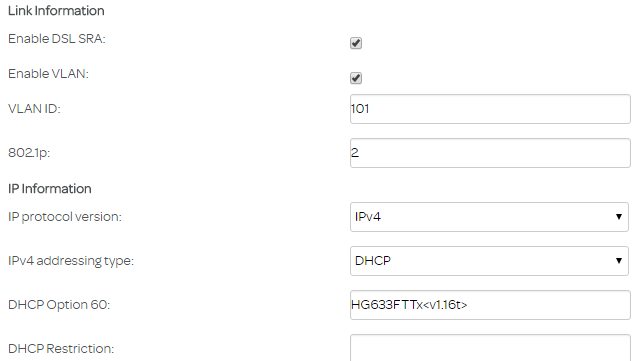
This is an attempt to get rid of piece of s.... called SuperRouter. The plan is to use OpenReach modem sourced on eBay with OpenWRT router (actually GL-MT300A). This is what is visible in TalkTalk router options: So I was going to reflect that configuration in router network configuration: root@OpenWrt:~# cd /etc/config/ root@OpenWrt:/etc/config# cp network network.ORIGINAL root@OpenWrt:/etc/config# vi network config globals 'globals'         option ula_prefix 'fc00:11111:1111::/48' config interface 'lan'         option type 'bridge'         option ifname 'eth0.1'         option proto 'static'         option ipaddr '192.168.147.1'         option netmask '255.255.255.0'         option ip6assign '60' config device 'lan_dev'         option name 'eth0.1'         option macaddr '...

GL.iNet GL-MT300A flashing trunk DD

The right image to flash is here: https://downloads.openwrt.org/snapshots/trunk/ramips/mt7620/openwrt-ramips-mt7620-gl-mt300a-squashfs-sysupgrade.bin the md5sum was $ cat md5sums | grep gl-mt 6897028a70dcdc97d10fcc1b2d82f0a8 *openwrt-ramips-mt7620-gl-mt300a-squashfs-sysupgrade.bin Replacing original firmware: login as: root root@192.168.8.1's password: BusyBox v1.23.2 (2016-04-14 17:11:33 HKT) built-in shell (ash)    ______  _____          ____    ____  _________  ______     ____      ____  .' ___  ||_   _|        |_   \  /   _||  _   _  |/ ____ `. .'    '.  .'    '. / .'   \_|  | |     ______ |   \/   |  |_/ | | \_|`'  __) ||  .--.  ||  .--.  | | |   ____  | |   _|______|| |\  /| |      | |    ...

GL.iNet GL-MT300A all packages in firmware 2.19

Image
The purpose of this post is to retain configuration of manufacturer provided firmware to easilly flash "stocked OpenWRT". First let's check what packages are installed: root@GL-MT300A:~# opkg list-installed base-files - 157.2-r47065 blkid - 2.25.2-4 busybox - 1.23.2-1 chat - 2.4.7-6 comgt - 0.32-25 dnsmasq - 2.73-1 dropbear - 2015.67-1 ethtool - 3.18-1 fcgi - 2.4.0-1 firewall - 2015-07-27 fstools - 2016-01-10-96415afecef35766332067f4205ef3b2c7561d21 gl-inet - 1 hostapd-common - 2015-03-25-1 ip - 4.0.0-1 ip6tables - 1.4.21-1 iptables - 1.4.21-1 iptables-mod-conntrack-extra - 1.4.21-1 iptables-mod-ipopt - 1.4.21-1 iw - 4.3-1 iwinfo - 2015-06-01-ade8b1b299cbd5748db1acf80dd3e9f567938371 jshn - 2015-11-08-10429bccd0dc5d204635e110a7a8fae7b80d16cb jsonfilter - 2014-06-19-cdc760c58077f44fc40adbbe41e1556a67c1b9a9 kernel - 3.18.27-1-04314c31bed8f992ea845699355da566 kmod-cfg80211 - 3.18.27+2016-01-10-1 kmod-crypto-aes - 3.18.27-1 kmod-crypto-arc4 - 3.18....